BEP20 Binance Smart Chain Wallet: How to Create and Use One in 2026
Learn how to create a BEP20 Binance Smart Chain wallet, find your BSC wallet address, send and receive BEP20 tokens, pay gas fees, and stay secure.
Sep 04, 2026
14 mins read
A BEP20 Binance Smart Chain wallet is a crypto wallet that can interact with BEP20 tokens on BNB Smart Chain (BSC), the network formerly called Binance Smart Chain. It allows users to receive, send, manage, swap, and use BEP20 assets while interacting with decentralized applications built across the BNB Chain ecosystem.
That ecosystem remains substantial in 2026. At the time of writing, BNB Smart Chain has approximately $5.48 billion in DeFi total value locked (TVL) and $13.39 billion in stablecoin market capitalization.
The network recorded roughly 1.85 million active addresses and 15.94 million transactions over 24 hours, while its decentralized exchanges processed more than $1 billion in daily volume. These figures change continuously, but they demonstrate why BEP20-compatible wallets remain important infrastructure for crypto users and Web3 businesses.
If you want to understand a BEP20 BSC wallet address, set up a Binance wallet BEP20 connection, receive USDT, or simply create a BEP20 wallet, this guide will take you from first principles through to practical usage and security.
What is a BEP20 Binance Smart Chain Wallet?
So, what is a BEP20 wallet? A BEP20 wallet is a wallet that can support accounts and transactions on BNB Smart Chain and interact with BEP20 standard tokens. The tokens stay on the blockchain, but the wallet gives you the keys, account interface, signing ability, and network connection to control them.
What is the BEP20?
BEP20 is the fungible-token standard of the BNB Smart Chain. It conceptually plays a similar role to ERC20 on Ethereum in that it defines common token functions like transferring assets, checking balances, and approving another address or smart contract to spend tokens.
This means that a BEP20 crypto wallet must be able to understand BNB Smart Chain transactions and interact with BEP20 token contracts.
What is BNB Smart Chain?
BNB Smart Chain is an EVM-compatible blockchain. Many people still call it by its old name, Binance Smart Chain or BSC, which is why you can find search phrases like “BEP20 Binance Smart Chain wallet.”
The current BSC mainnet uses Chain ID 56, BNB as its native gas asset, and BscScan as its primary blockchain explorer.
How Does the BEP20 Crypto Wallet Work?
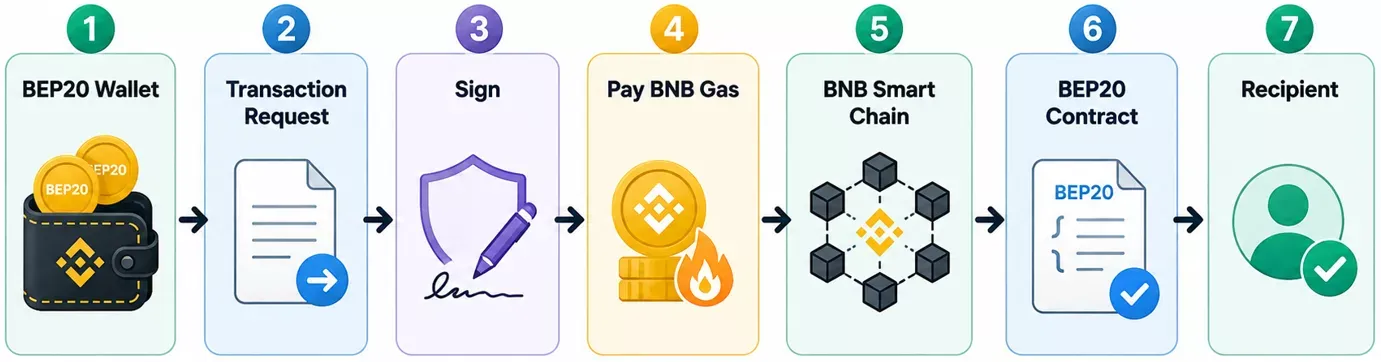
Sending a BEP20 token is easy. Your wallet will create the transaction, ask you to approve it, sign it with the correct cryptographic credentials, and broadcast it on BNB Smart Chain. The transaction is validated by the validators, and the blockchain updates the relevant token balances.
For businesses planning a branded wallet rather than simply using an existing one, crypto wallet development involves designing the custody model, signing architecture, blockchain connectivity, transaction workflows, recovery mechanisms, and security controls behind the user interface.
What Is a BEP20 BSC Wallet Address?
The BEP20 wallet address is a public address on the blockchain to receive assets on BNB Smart Chain. BSC uses the EVM address format. Addresses are typically represented as hex strings with a 0x prefix.
A simplified example looks like this:
0x1234...abcd
The sender might provide the public address. Never share your private key, seed phrase, recovery credentials, or signing authorization.
BEP20 and BSC addresses are the same thing.
In general use, a BEP20 address and a BSC wallet address are usually the same account address when using the BNB Smart Chain. "BEP20" refers to the token standard, while BSC refers to the blockchain network.
Is a BEP20 address the same as an ERC20 address?
Ethereum and BNB Smart Chain use EVM-style addresses, so they may appear identical. This is not to say that the networks are interchangeable.
The address that appears identical on both Ethereum and BSC can have different asset states on each blockchain. That’s why users sometimes send assets on the wrong network.
How to Create a BEP20 Wallet Address Step by Step
Typically, you don’t make a separate address for each BEP20 token. Or, you can create or import an EVM-compatible wallet account and use its BNB Smart Chain address for supported BEP20 assets.
Step 1: Choose a BEP20-Compatible Wallet
Choose a trustworthy wallet that supports BNB Smart Chain. There are mobile wallets, browser extensions, hardware wallets, and multi-chain Web3 wallets, among others.
Evaluate the custody model, recovery method, dApp support, device compatibility, transaction visibility, and security instead of just popularity.
STEP 2: Create Your Wallet or Import an Existing Wallet
Follow the official onboarding of the wallet. Depending on its architecture, you may get a recovery phrase or a different recovery/key-management mechanism.
Never submit recovery credentials to an untrusted website.
Step 3: Choose BNB Smart Chain
Many modern multi-chain wallets include BSC by default. If manual configuration is required, refer to the official BNB Chain documentation for network parameters.
The BSC mainnet Chain ID is 56, and its native currency is BNB.
Step 4: Get Your Receiving Address
Open the receive interface and choose BNB Smart Chain or the appropriate BEP20 asset. You can copy the address shown or use the QR code.
Step 5: Confirm Before Transfer
Confirm that both sender and receiver are using BNB Smart Chain/BEP20. For a meaningful transfer, consider sending a small test amount first.
What Wallets Support BEP20 Tokens?
Today, BNB Chain has a few wallet types in its ecosystem, including traditional user wallets and newer agent-oriented wallets. Popular consumer options include Binance Wallet, Trust Wallet, and MetaMask.
Trust Wallet
Trust Wallet is a mobile-focused BNB Smart Chain wallet; it supports BEP20 assets, swaps, and interacts with dApps. Users retain responsibility for protecting their recovery credentials.
MetaMask
Because BNB Smart Chain is EVM-compatible, MetaMask can interact with BSC. Modern configurations make network selection straightforward, while manual network configuration remains possible.
Binance Wallet
Binance Wallet provides Web3 functionality for managing assets and interacting with decentralized applications. It should not be confused with simply holding assets in a centralized Binance exchange account.
Hardware Wallets
Hardware wallets can also offer better isolation of signing keys, which is attractive to users who want to secure their assets over the long term. Hardware security, however, does not eliminate phishing, malicious approvals, or user verification mistakes.
|
Wallet Option |
Wallet Type |
Custody |
BSC/BEP20 Support |
dApp Access |
Hardware Compatibility |
|
Trust Wallet |
Mobile + browser extension |
Self-custody |
Yes |
Yes |
Limited/direct hardware integration varies |
|
MetaMask |
Browser + mobile |
Self-custody |
Yes |
Yes |
Yes – supports Ledger, Trezor and others |
|
Binance Wallet |
Web3 wallet within Binance ecosystem |
Self-custody/MPC-based architecture |
Yes |
Yes |
Not its primary model |
The functionality found in modern BEP20 wallets also reflects the broader direction of Web3 wallet development, where multi-chain assets, dApp connectivity, swaps, signing controls, and decentralized services are increasingly brought into a single wallet experience.

Create Your BEP20 Wallet and Start Using BNB Smart Chain
Set up a compatible wallet, select BNB Smart Chain, secure your credentials, and prepare to manage BEP20 assets.
Talk To Our ExpertsHow to Add BEP20 Tokens to Your Wallet
A token may exist at your address even when it does not appear automatically in the wallet interface.
Find the Correct Contract Address
Use reliable project documentation and a reputable blockchain explorer such as BscScan to identify the token's BNB Smart Chain contract. Never copy a contract address from an unsolicited message or advertisement.
Businesses launching their own assets should also understand BEP20 token development, because token contract design, decimals, supply controls, permissions, and contract verification directly affect how a token is recognized and managed by compatible BSC wallets.
Import the Token
If your wallet supports custom-token imports, paste the verified contract address. The wallet may automatically retrieve the symbol and decimals.
BNB Chain's current troubleshooting documentation specifically recommends verifying the network and manually importing the token contract when an asset does not appear.
Why Tokens Sometimes Disappear From View
A missing balance does not necessarily mean lost funds. Common explanations include:
- The wallet is displaying another network
- The token has not been imported
- The transaction is still pending
- An incorrect token contract was added.
Check the blockchain explorer before assuming an asset is lost.
How to Receive BEP20 Tokens Safely
Receiving BEP20 assets is straightforward, but network verification matters.
Open your wallet, select BNB Smart Chain, choose the relevant asset or receive option, and copy your BEP-20 BSC wallet address.
Before the sender confirms the transaction:
- Verify the complete address.
- Select BEP20/BNB Smart Chain.
- Confirm the asset exists on BSC.
- Consider a small test transaction.
- Check the transaction on BscScan afterward.
A common mistake is focusing only on whether the address looks correct. Ethereum and BSC addresses can look identical, while the underlying blockchain state remains separate.
How to Send BEP20 Tokens and Pay BNB Gas
To send a BEP20 token, your wallet needs enough BNB to pay network gas fees.
Enter the recipient's address, select the BEP20 asset and amount, verify that BNB Smart Chain is selected, review the transaction details, and authorize the transaction.
Your wallet signs the transaction and broadcasts it to BSC.
Why Do You Need BNB?
BNB is the native gas asset of BNB Smart Chain. Even when transferring USDT or another BEP20 token, the standard transaction requires BNB to cover network execution fees.
BEP20 vs ERC20 vs TRC20: What Is the Difference?
These labels represent token standards associated with different blockchain environments.
|
Factor |
BEP20 |
ERC20 |
TRC20 |
|
Primary network |
BNB Smart Chain |
Ethereum |
TRON |
|
Native gas asset |
BNB |
ETH |
TRX |
|
Address style |
0x... |
0x... |
Usually T... |
|
Smart contracts |
Yes |
Yes |
Yes |
|
Main ecosystem |
BNB Chain |
Ethereum |
TRON |
The important point is network compatibility. A USDT token can exist in different representations across several networks. “USDT” alone therefore does not tell you which network should be selected for a transfer. Check the sending network and receiving network every time.
Turn Your BEP20 Wallet Idea Into a Business-Ready Product
Define custody, security, token support, Web3 integrations, recovery, analytics, and scalability before moving into wallet development.
Request A ProposalHow to Keep Your BEP20 Crypto Wallet Secure
Wallet security is not a single feature. It combines key protection, transaction verification, device security, dApp hygiene, recovery design, and user behavior.
Protect recovery credentials offline and never disclose them to anyone claiming to provide support. Use hardware-backed protection where appropriate, enable strong device authentication, and download wallet applications only through verified sources.
Before approving a smart-contract transaction, inspect what the application is requesting. Token approvals can authorize contracts to spend assets, so permissions should be reviewed periodically and unnecessary allowances removed.
Also watch for phishing domains, fake tokens, malicious dApps, and address poisoning, where attackers try to make a fraudulent address resemble one previously used.
Because wallet protection extends beyond safeguarding a seed phrase, users and businesses should follow proven crypto wallet security best practices covering phishing, malicious approvals, transaction signing, recovery, private keys, dApp permissions, and compromised-wallet response.
Common BEP20 Wallet Problems and How to Fix Them
BEP20 Tokens Are Not Showing
First, confirm the transaction succeeded on BscScan. Then check that the wallet is displaying BNB Smart Chain and that the correct token contract has been imported.
Insufficient BNB for Gas
Holding a BEP20 token does not automatically provide gas. Add enough BNB to the wallet to execute the transaction.
Sent Tokens Through the Wrong Network
Do not immediately send another transaction. Determine which blockchain actually received the assets and whether you control the same address on that network.
Binance's current guidance notes that Ethereum and BSC use the same address format, which can make wrong-network transfers particularly confusing.
Transaction Failed
Check the BNB balance, network status, transaction parameters, and the relevant smart contract. Avoid repeatedly submitting transactions without identifying the failure.
How Can You Use a BEP20 Wallet With DeFi and Web3?
A modern BEP20 crypto wallet can do far more than receive and send tokens.
Compatible wallets can connect users to decentralized exchanges, lending protocols, staking applications, NFT platforms, blockchain games, and other BNB Chain dApps.
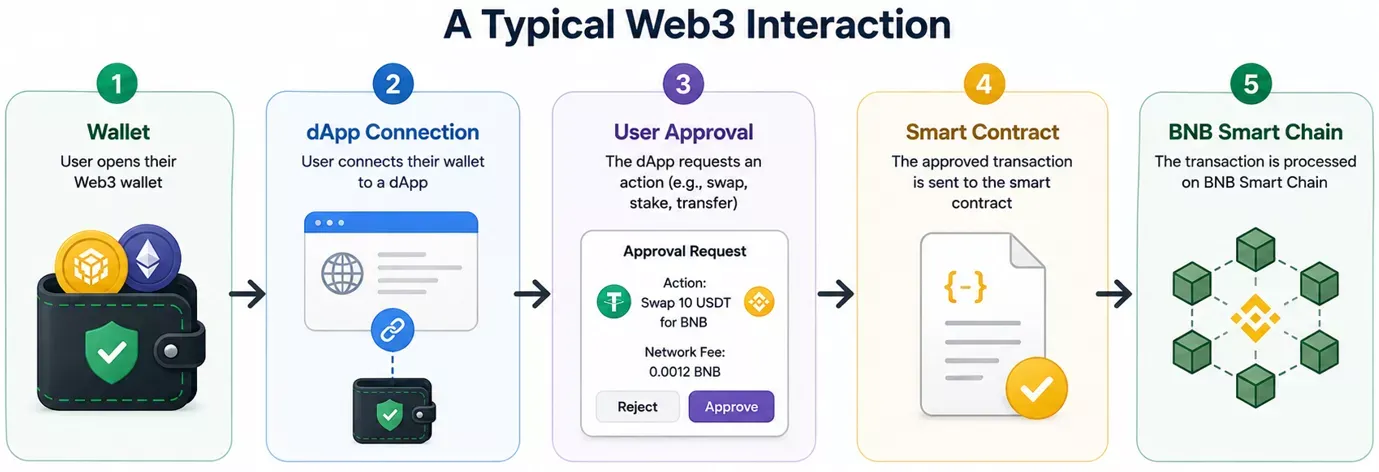
Users should still treat every connection and signature as a security decision. Connecting a wallet does not automatically transfer assets, but subsequent approvals and signatures may grant meaningful permissions.
How Does a BEP20 Wallet Work Under the Hood?
Behind the familiar Send and Receive buttons, there is a series of cryptographic and blockchain interactions.
Accounts are derived from crypto keys in the traditional self-custody wallet. The public address is used to identify the account. The signing authority is used to show that the holder is authorized to begin transactions.
The wallet, when receiving a BEP20 token, creates a call to the proper token contract, estimates gas, gets authorization, signs the transaction, and sends it through an RPC endpoint to BNB Smart Chain.
The transaction is verified and executed by the blockchain. The wallet then pulls the resulting state and shows the new balance.
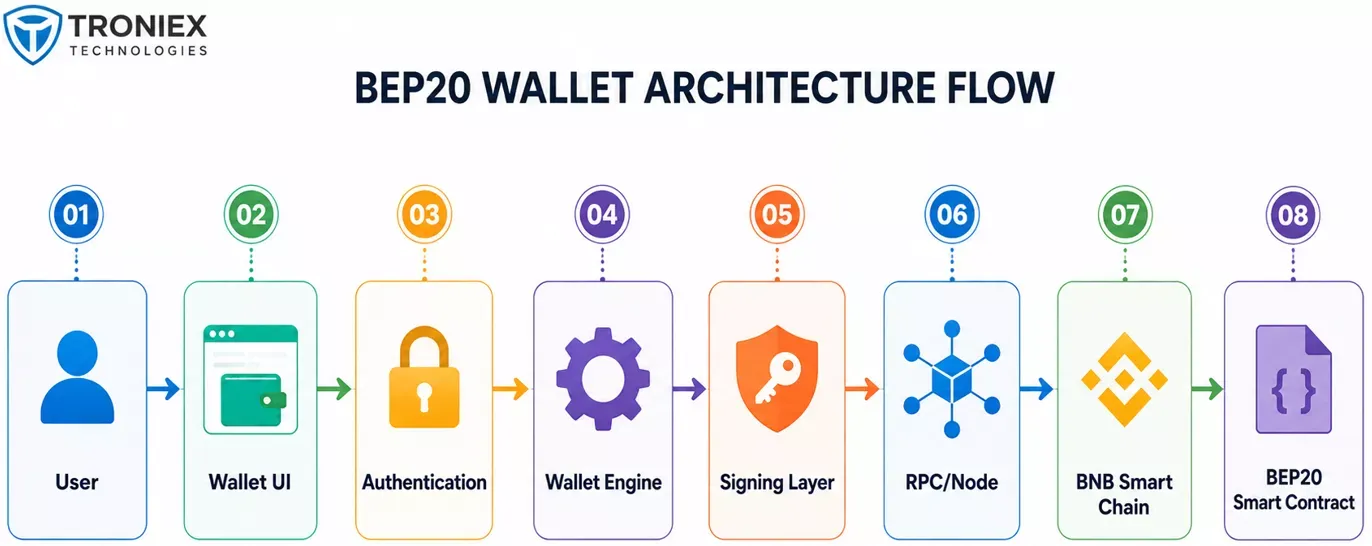
This is also where the difference between using a wallet and building a wallet comes in. Users see an interface, but behind that wallet, developers are required to engineer secure signing, blockchain connectivity, transaction processing, recovery, and monitoring.
If you want to move beyond using a BEP20 wallet and understand the complete product-building process, our guide on how to create your own crypto wallet app covers custody models, architecture, signing, APIs, security, testing, cost, and deployment.
Build Your Own BEP20 Wallet for BNB Smart Chain
Move from using existing wallets to planning a custom or white-label product with purpose-built features, security, integrations, and branding.
Contact UsDo you want to make your own BEP20 Wallet on BNB Smart Chain?
Creating a BEP20 wallet address for personal use is very easy. Building a secure wallet product for customers is a very different engineering problem.
For a production BEP20 wallet, you may need mobile and web interfaces, secure key management or MPC, BSC RPC infrastructure, token indexing, transaction monitoring, gas estimation, WalletConnect, DeFi integrations, authentication, recovery, analytics, and security testing.
Businesses also need to determine whether the wallet should be custodial or non-custodial, BSC-only or multi-chain, custom-built or based on an existing wallet framework.
If you are evaluating a commercial product, you should define the custody model, target users, tokens supported, security requirements, integrations, and the future chain roadmap before choosing the technology stack.
Last Takeaway
With a BEP20 Binance Smart Chain wallet, users can access BEP20 tokens and the larger BNB Smart Chain ecosystem. To use one safely, know the difference between a wallet and an address, check the network before each transfer, keep BNB for gas, validate token contracts, and protect your signing credentials.
To begin, users first need to create a BEP20 wallet. For businesses, that same wallet is infrastructure connecting users, tokens, smart contracts, DeFi applications, and blockchain services.
Before finalizing the scope, review the major factors affecting crypto wallet development cost, including custody architecture, supported networks, MPC or HSM infrastructure, Web3 integrations, security testing, compliance requirements, and ongoing blockchain infrastructure.