
How to Migrate a PHP Website to Next.js: Cost and Timeline
Migrate a PHP site to Next.js in 8 steps: inventory routes, choose a phased pattern, proxy both stacks, move high-value routes first, port forms and auth, move data, protect SEO with 301 redirects, then cut over. Our projects run 1.5 to 9 months and cost $6,000 to $120,000, set by route count, auth, and integrations.
Nov 02, 2026
14 mins read
You run a PHP site and want to migrate it to Next.js without losing traffic, users, or data. This guide gives you the 8-step sequence we recommend, from route inventory to PHP shutdown. It also gives you cost and timeline ranges, so you can set a budget before you talk to a vendor. You will see when a PHP 8 upgrade is the better call.

Planning a PHP to Next.js Move?
Send Troniex your route list and get a scoped estimate with a phased plan and a 301 redirect outline.
Get a Migration Estimate- Upgrade PHP first when security is your only driver. Move to Next.js when speed, hiring, or a new product surface justifies it.
- A phased (strangler) migration rolls back one route at a time. A full rewrite rolls back everything.
- Your Step 1 route inventory sets both the price and the timeline. Build it before you request quotes.
- Map every old URL to one new URL with a 301, and watch Search Console for 4 weeks after each route moves.
- Troniex ranges run from $6,000 to $120,000 by scope. Your route inventory decides where your site lands.
PHP 8 Upgrade or Next.js Migration: Which One to Choose
A PHP 8 upgrade closes most security gaps on an unsupported runtime, and it costs less than a rewrite: $6,000 to $15,000 in the ranges below, against $15,000 and up for a Next.js rewrite.
Move to Next.js when the front end, page speed, or hiring drives the decision. Three situations fit:
- Your marketing pages need fast, server-rendered output.
- Your team writes TypeScript and struggles to hire PHP developers.
- You plan a new product surface on top of the same API.
If security is your only driver, start with the PHP 8 migration guide and stop there. If you do both, upgrade PHP first. The new PHP version then runs safely while you move routes one at a time.
What You Need Before You Migrate a PHP Website
- SSH and database access to production
- A full backup of code, database, and server config
- Admin access to Google Search Console and your analytics
- A list of forms, cron jobs, payment hooks, and third-party integrations
- A staging host that mirrors production
PHP to Next.js Migration Steps at a Glance
- Inventory routes, forms and integrations.
- Choose a pattern: phased or full rewrite.
- Put a reverse proxy in front of both stacks.
- Build the shared layout, then move high-value routes first.
- Replace PHP forms, sessions and auth.
- Move data and APIs.
- Protect your SEO.
- Test, cut over route by route and retire PHP.
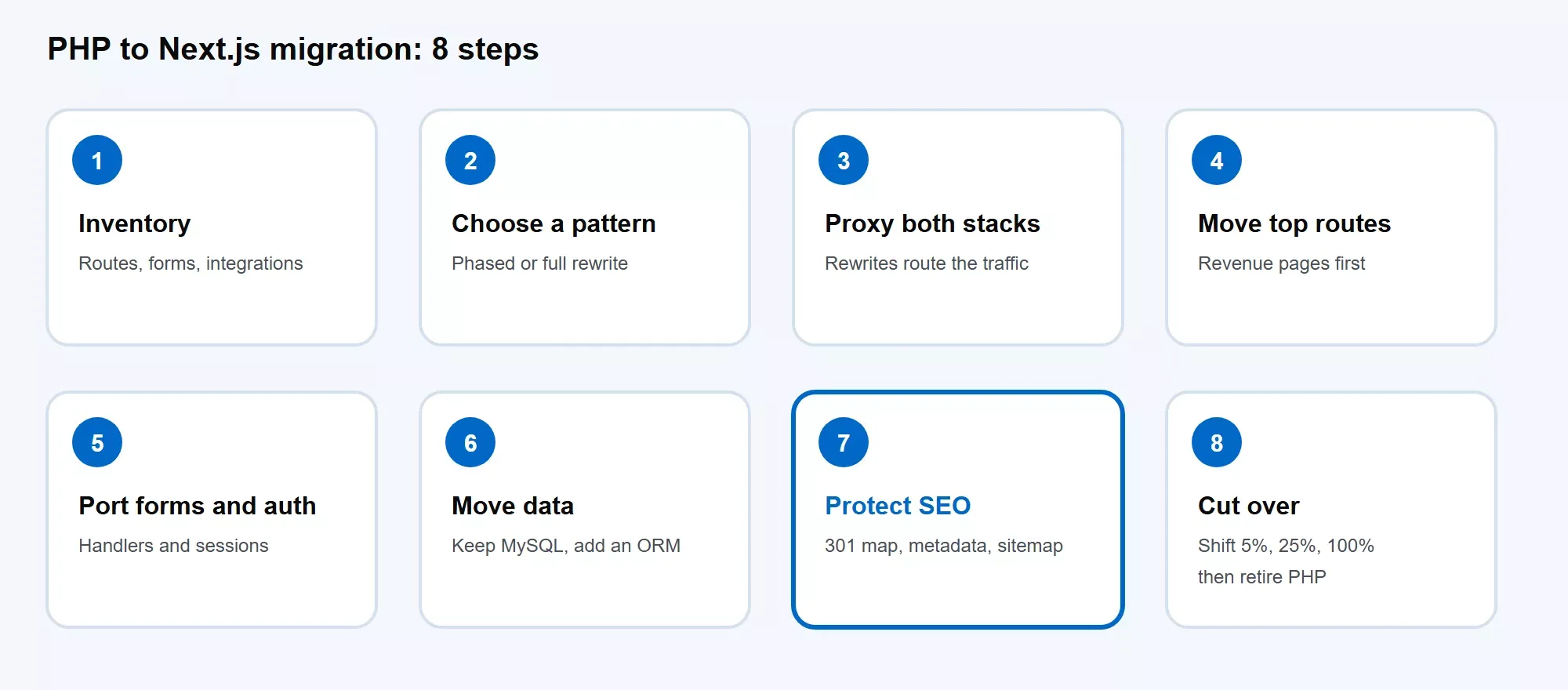
The 8-step sequence. Step 7 carries the most ranking risk.
Step 1: Inventory Your PHP Routes, Forms and Integrations
Start with a full list of what the PHP site does. Crawl the site, export URLs from the sitemap, and pull your top pages from Search Console. List every template, form, login flow, cron job, and outbound API call.
Rank each route by organic clicks, backlinks, and revenue. This ranking sets your migration order in Step 4 and your price in the cost section below.
The most common mistake is skipping low-traffic URLs. A page with few visits still carries backlinks you lose without a redirect.
Step 2: Choose Between the Strangler Pattern and a Full Rewrite
A phased migration, called the strangler pattern, replaces the PHP app one route at a time. A full rewrite builds the whole Next.js app first and switches once. Pick by how much downtime and revenue risk you accept.
|
Pattern |
Typical duration |
Typical cost (USD) |
Best for |
|---|---|---|---|
|
PHP upgrade plus partial Laravel |
1.5 to 3 months |
$6,000 to $15,000 |
Sites that need security fixes, not a new front end |
|
Progressive Next.js rewrite |
3 to 7 months |
$20,000 to $60,000 |
Mid-size apps with live revenue |
|
Strangler migration |
4 to 9 months |
$40,000 to $120,000 |
Large apps that cannot go offline |
|
Big-bang rewrite |
3 to 6 months |
$15,000 to $45,000 |
Small apps with low traffic and clear specs |
These are starting ranges, not fixed quotes.
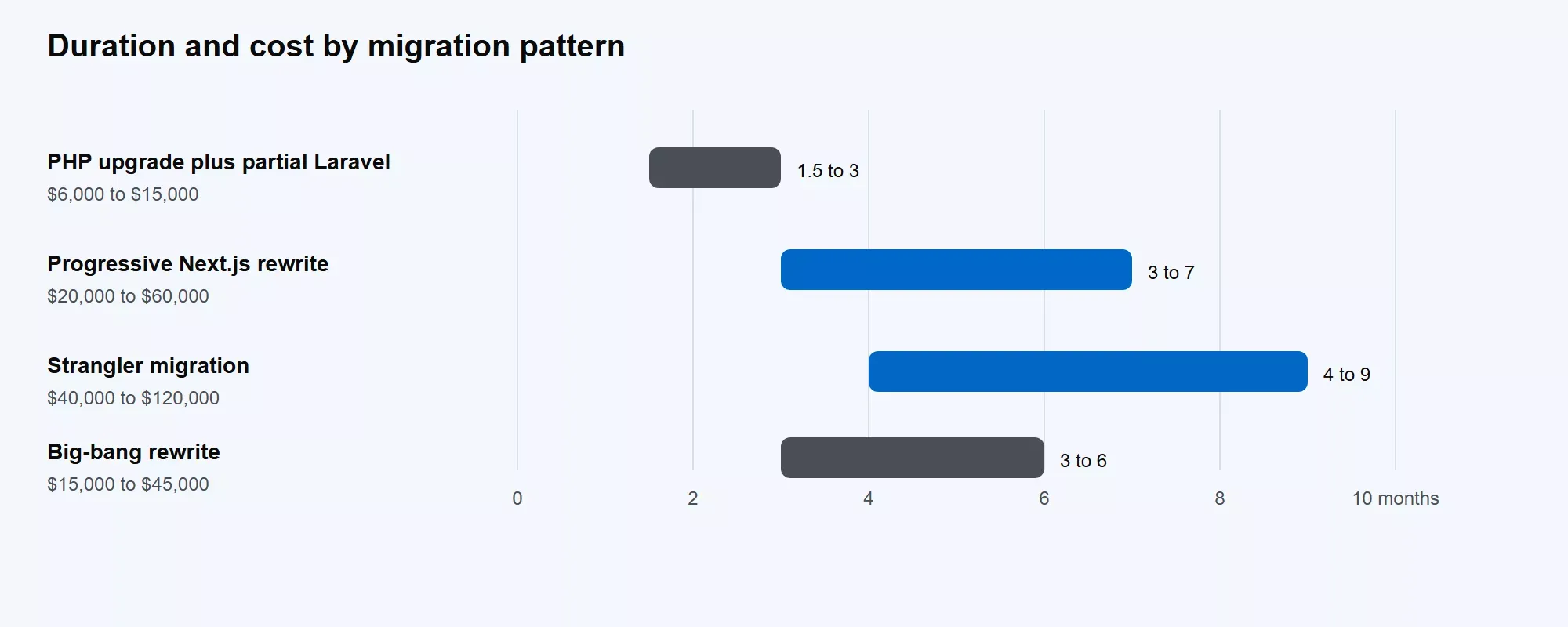
The first row keeps PHP and adds Laravel, so it is the baseline, not a Next.js move.
For a revenue-bearing site, the strangler pattern wins. You ship value after the first route, and a failure rolls back one route instead of the whole site.
Step 3: Set up a Reverse Proxy for PHP and Next.js
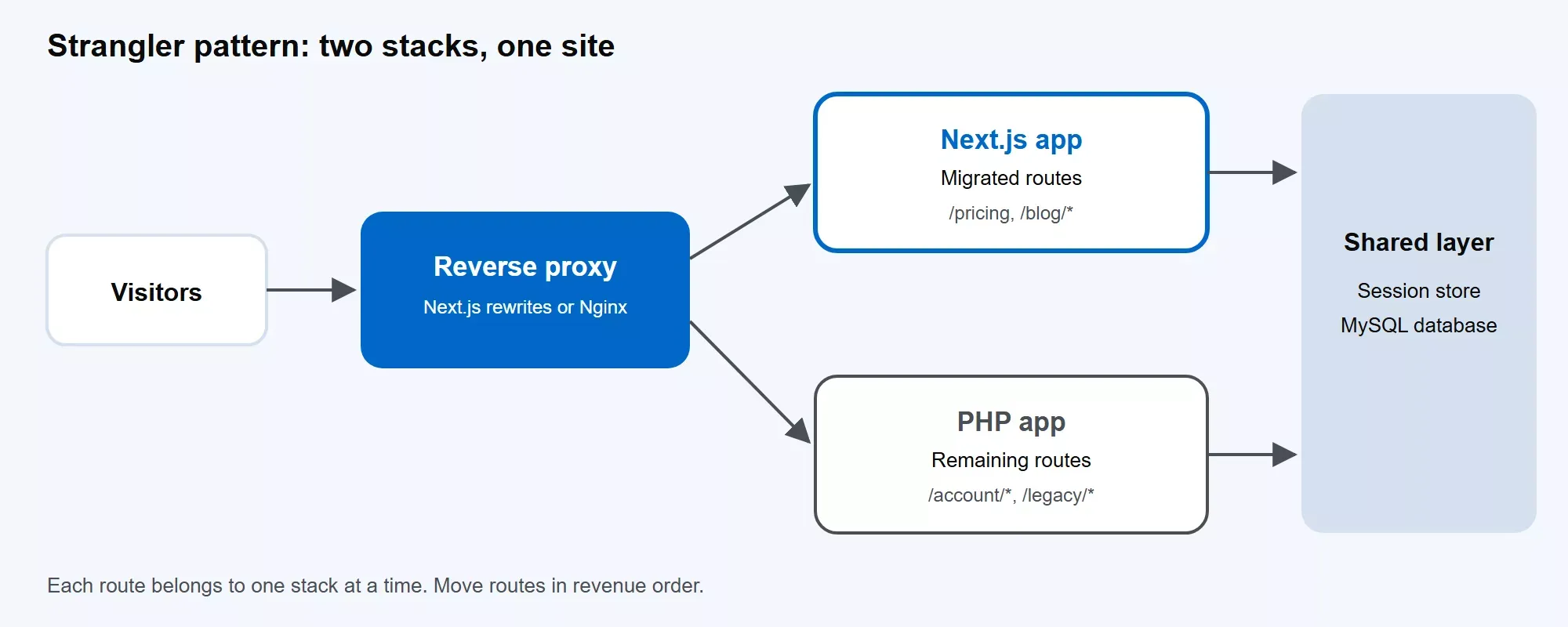
A reverse proxy sends each route to the stack that owns it.
Your visitors should see one site while two apps serve it. Route migrated paths to Next.js and send everything else to PHP. Next.js handles this with a fallback rewrite. Any path Next.js does not serve falls through to the PHP app. Nginx or your load balancer does the same job if you prefer to keep routing out of the app.
Never serve one page from both stacks. Two live versions of a URL create duplicate content and split your ranking signals. Each route belongs to one stack at a time.
Step 4: Build the Next.js Layout, then Move High-value Routes First
Build the header, footer, navigation, and design tokens first. Every route reuses them. Then move routes in the order from your Step 1 ranking: revenue pages and top organic pages before the long tail.
Pick the rendering mode for each page type:
|
Page type |
Rendering mode |
|---|---|
|
Marketing and service pages |
Static generation |
|
Blog and catalog pages |
Incremental regeneration |
|
Logged-in dashboards |
Server rendering |
|
Search results and filters |
Server rendering |
Static generation serves prebuilt pages from a CDN, which cuts response time for pages that do not change per user. Use server rendering only where the page depends on the user or on live data.
Step 5: Replace PHP Forms, Sessions and Authentication
Each PHP form handler becomes a Next.js route handler or a Server Action. Port the validation rules with the handler, not after it. A form that loses a rule accepts bad input in production.
Sessions need a plan, because Next.js does not read PHP session files. While both stacks run, both must recognize the same login. Store sessions in a shared Redis instance or database table, or set a signed cookie that both apps verify.
Existing passwords stay valid. PHP's password_hash writes bcrypt hashes with a 2y prefix. Test your Node bcrypt library against real hashes from production before cutover, and swap the prefix to 2b if the library rejects it.
The most common mistake here is logging every user out at cutover. That spike in support tickets is avoidable.
Step 6: Connect Next.js to Your MySQL Data and APIs
Keep MySQL in place at first. Connect Next.js to it through an ORM such as Prisma or Drizzle, and generate the schema from the live database. Migrating the database is a separate project with its own risk, so do not attach it to the front-end move.
Run reads through the new stack first and compare results against PHP. Move writes route by route after the reads match. Plan the final data cutover as its own phase, followed by a short window to retire the old app.
Step 7: Set up 301 Redirects and Protect your SEO
A migration changes URLs, rendering, and metadata at once. Rankings drop when any of the three goes wrong, so give this step its own owner.
- Build a one-to-one 301 map. Every old URL points to its exact new counterpart. Next.js sends a 308 for permanent redirects, and Google treats a 308 like a 301.
- Keep URL patterns wherever possible. When URLs do change shape, set
trailingSlashonce and keep it consistent. - Rebuild metadata. Titles, descriptions, and canonicals move into the Metadata API. Compare them against the PHP originals.
- Re-add structured data. Output your JSON-LD in each page template.
- Regenerate the sitemap and resubmit it in Search Console.
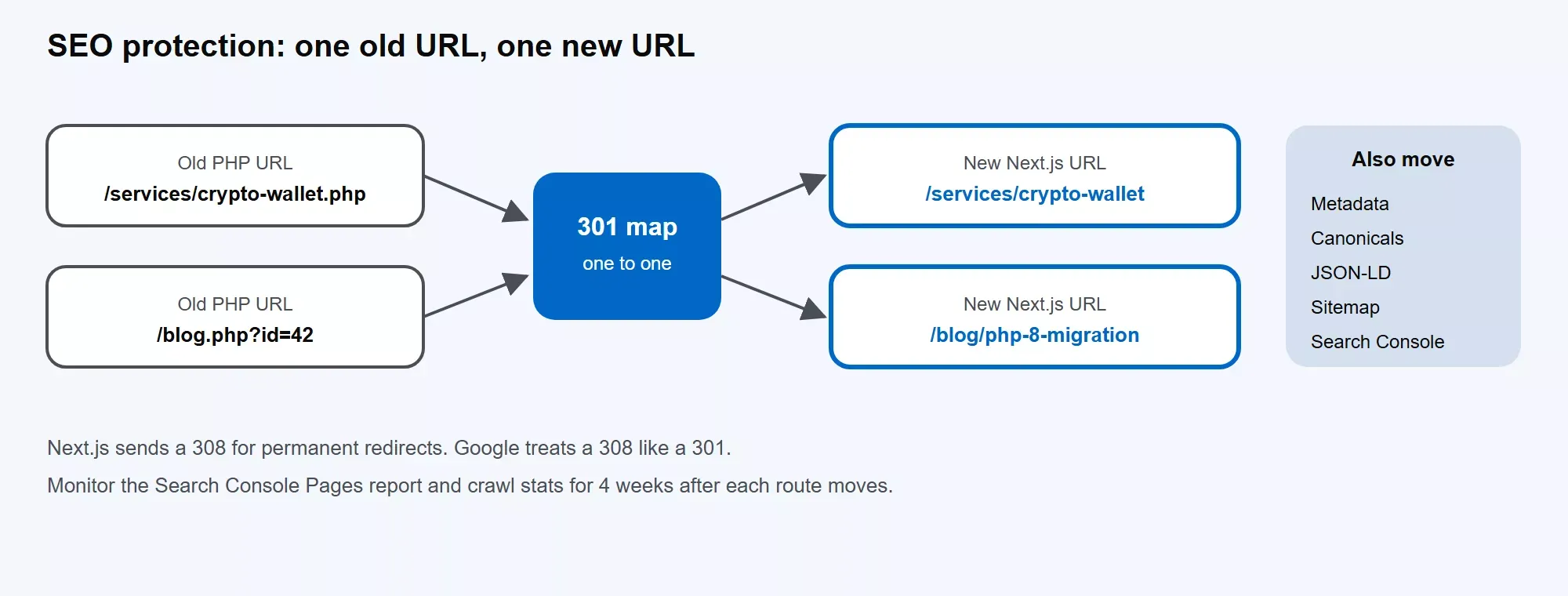
Every old URL maps to one new URL. Metadata and structured data move with it.
Monitor the Pages report and crawl stats in Search Console for 4 weeks after each route moves. Google's site move documentation lists every check.
Step 8: Test, Cut Over Route by Route and Retire the PHP App
Before each route moves, run regression tests that compare PHP and Next.js output for the same inputs. Check the response body, status code, headers, and form behavior.
Then shift traffic in stages: 5%, 25%, then 100%. Keep the PHP route live and ready for 7 days after each cutover. Shut down the PHP app only after traffic, error rates, and conversions hold steady on the new stack.
Want an Engineer to Check your Plan Before You Commit?
Walk a Troniex developer through your route inventory, auth setup, and data model. You leave with a risk list and a recommended pattern.
Book a Migration ConsultationPHP to Next.js Migration Cost: What Drives the Price
Six inputs set your price. Measure each one on your own site before you ask for quotes.
|
Cost driver |
Why it moves the price |
How to measure it |
|---|---|---|
|
Route count |
Every route needs a build, a test, and a redirect |
Count URLs in your sitemap and Step 1 inventory |
|
Auth and sessions |
Shared login across two stacks adds build and test time |
List login methods, roles and SSO providers |
|
Data volume and schema |
Messy schemas slow every query you move |
Count tables and flag unused ones |
|
Integrations |
Each payment, CRM, or email hook needs a rebuild |
List outbound API calls and webhooks |
|
Test coverage |
Low coverage means manual regression checks |
Run your test suite and note coverage |
|
Design rework |
A new UI takes more build time than reusing your current design |
Count templates that need a redesign |
Troniex Pricing by Site Scope: Pages, Routes and Integrations
Troniex prices a migration by scope. Match your site to a row, then read the range for that pattern.
|
Scope |
Pages and routes |
Login and roles |
Integrations |
Pattern |
Timeline |
Cost (USD) |
|---|---|---|---|---|---|---|
|
Security fix, front end stays |
Any size |
Unchanged |
Unchanged |
PHP upgrade plus partial Laravel |
1.5 to 3 months |
$6,000 to $15,000 |
|
Small site, clear specs |
Up to 25 pages |
None |
0 to 2 |
Big-bang rewrite |
3 to 6 months |
$15,000 to $45,000 |
|
Mid-size site with live revenue |
25 to 150 routes |
1 role |
3 to 6 |
Progressive Next.js rewrite |
3 to 7 months |
$20,000 to $60,000 |
|
Large app that cannot go offline |
150+ routes |
Multiple roles or SSO |
6+ |
Strangler migration |
4 to 9 months |
$40,000 to $120,000 |
Inside a row, fewer routes and no login land near the low end. Many routes, shared auth, and extra integrations land near the high end.
PHP to Next.js Migration Timeline by Phase
Your total timeline is the sum of six phases. Route count and test coverage set most of it.
|
Phase |
What sets the duration |
Planning note |
|---|---|---|
|
Inventory and planning |
Site size, number of integrations |
Set by your Step 1 list |
|
Layout and first routes |
Design system readiness |
Set by route count |
|
Auth, forms and APIs |
Login method, form count |
Set by Step 5 scope |
|
Data cutover |
Data volume, schema quality |
Plan as its own phase |
|
SEO checks and monitoring |
Number of URLs redirected |
4 weeks of monitoring |
|
PHP retirement |
Dependencies on the old app |
Short window after final cutover |
How to Reduce Migration Cost and Risk
- Upgrade PHP first. A supported runtime removes the urgency and the security exposure.
- Move revenue pages first, so the migration pays back early.
- Keep MySQL until the front end is stable.
- Write regression tests for the PHP app before you move any route. Tests turn a risky move into a comparison.
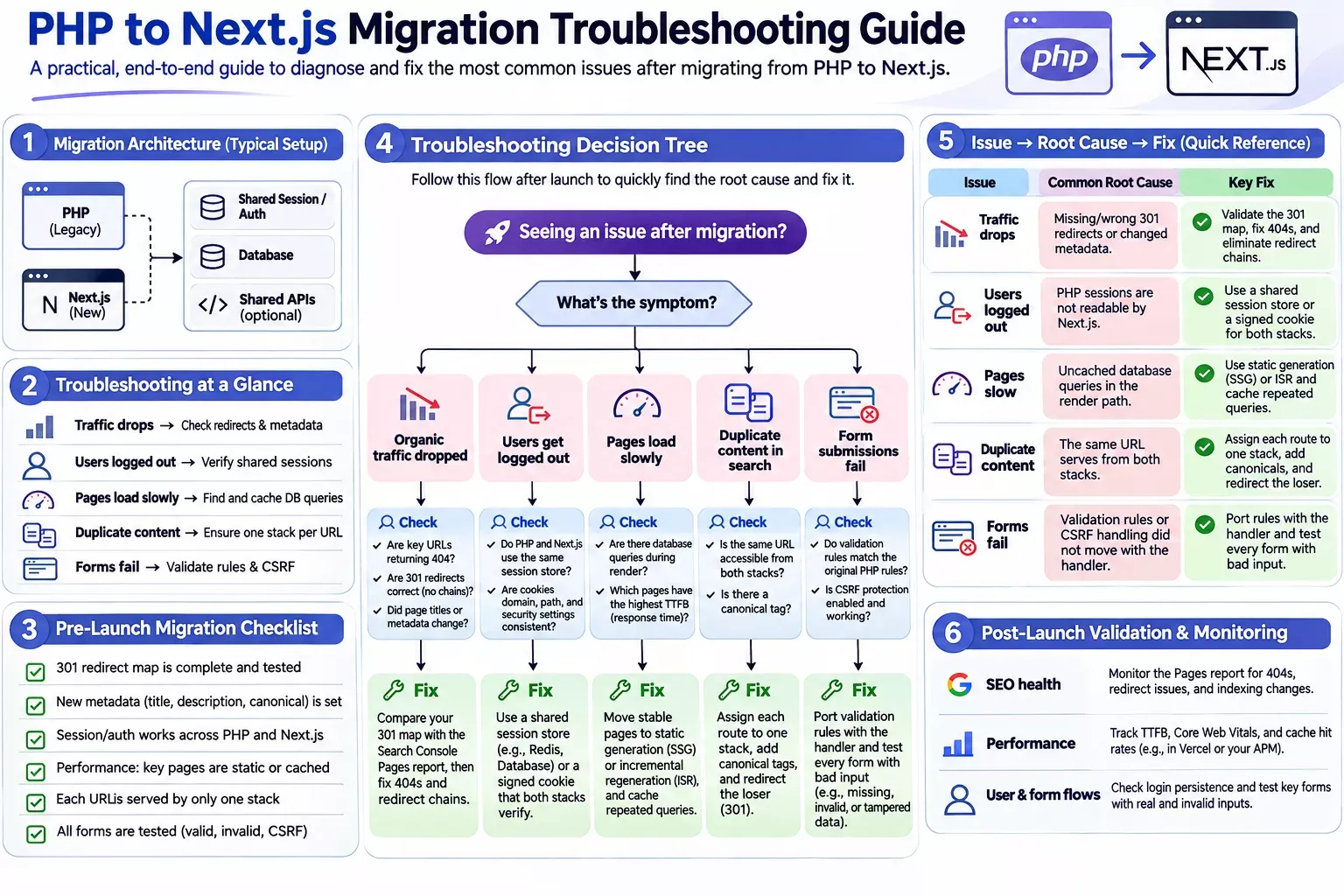
How to Troubleshoot Common PHP to Next.js Migration Problems
1. Organic traffic drops after launch
- Cause: Missing or wrong 301 redirects, or changed metadata.
- Fix: Compare your 301 map against the Search Console Pages report, then fix 404s and redirect chains first.
2. Users get logged out at cutover
- Cause: PHP sessions are not readable by Next.js.
- Fix: Use a shared session store or a signed cookie that both stacks verify.
3. Server-rendered pages load slowly
- Cause: Uncached database queries in the render path.
- Fix: Move stable pages to static generation or incremental regeneration, and cache repeated queries.
4. Duplicate content appears in search results
- Cause: The same URL serves from both stacks.
- Fix: Assign each route to one stack, add canonicals, and redirect the loser.
5. Form submissions fail
- Cause: Validation rules or CSRF handling did not move with the handler.
- Fix: Port rules with the handler and test every form with bad input.
Get a Scoped PHP to Next.js Migration Estimate from Your Route List
A PHP to Next.js migration succeeds when you move in small, reversible pieces. Each route you move ships on its own and rolls back on its own. Start with the route inventory from Step 1. It tells you how many pages, forms, and integrations you carry, and it places your site in the scope table above.
Next, pick the pattern. Choose a phased migration if the site earns revenue today, and a PHP 8 upgrade if security is the only pressure. Protect your rankings with a one-to-one 301 map before the first route moves, and watch Search Console for 4 weeks after each cutover.
Troniex ranges run from $6,000 to $45,000+ depending on scope, with timelines from 1.5 to 4 months+. Your own number depends on your routes, login setup, and integrations.
Send Troniex your route list. You get back a scoped estimate, a phased plan, and a 301 redirect outline. See our PHP to Node.js and Next.js migration services.
Get your PHP to Next.js Migration Scoped
Send Troniex your route list. You get a scoped estimate, a phased plan, and a 301 redirect outline, with projects starting at $6,000.
Get a Migration Estimate


